Learn more about AAC&U’s Project Kaleidoscope and the 2017 Active Learning Day
How can you participate in active learning?
- Spend at least 10 minutes implementing a culturally responsive STEM teaching strategy that promotes active learning in your classroom (Culturally Responsive Teaching is a pedagogy that recognizes the importance of including students’ cultural references in all aspects of learning);
- Identify innovative ways to deepen and extend your departmental/institutional commitment to inclusive STEM higher education reform throughout the week, academic year, and beyond;
- Tell a friend! Reach out to at least one colleague (in either a STEM or non-STEM discipline), and engage in dialogue around what they can do to implement similar strategies in their classroom;
- Tweet or post on social media about your participation using #ActiveLearningDay2017; and
- Share with others what you did on Active Learning Day by creating and uploading a two-minute video! Upload the video to YouTube and send us the link at pkal@aacu.org. We will showcase your effort on STEM Central.
Interested in participating and/or need help with making a video? Contact EdTech@mst.edu to schedule a videographer to stop by your classroom while you engage your students in an active learning exercise!
]]>
One of these technology platforms  is offered by SAP and their platform is based on their SAP HANA product. SAP HANA is an in-memory, column-oriented, relational database management system that is changing the ERP and “Big Data” landscape. HANA forgoes the traditional hard drive for data storage and instead stores all of its data in RAM. This allows for data to be accessed faster, and allows for data to be safely compressed by a factor of 10. The speed and data storage increases provided by HANA make it a powerful tool for analyzing data of all kinds. So with HANA and the help of some programming tools customer sentiment can be harvested from social media sources and then analyzed in near real time with business intelligence tools.
The results and insights from this type of analysis could be invaluable to an organization. Instructors could re-evaluate the instruction methods, and universities could reshape their messaging campaigns to ensure that their target audiences are reached with a clear message. The possibilities and benefits for this type of analysis in the future are immense as the importance of and dependency on social media increases across younger generations.
So hopefully in the near future if you wonder “What is Twitter saying about my class?” your answer will only be a few mouse clicks away.
]]>
You could show them how to use a breadboard and hope that mentally compiling and decompiling the circuit doesn’t overshadow the lesson the circuit’s meant to teach…

You could buy a kit with easy, snap-together components that can be quickly assembled and disassembled at the expense of scalability and authenticity…

All of the solutions have the same problem, though: At the end of the lesson, the circuit is disassembled and lost forever. Those wires need to be used again, the breadboard needs to be cleared for the next project, and those brightly-colored snapping components are too bulky expensive to keep your beautifully constructed XOR gate for future reference. Just draw the diagram and build it again next time.
Wouldn’t it be so much better if the circuit diagrams students drew in their notebooks could be real circuits?
Clear some space in your pocket protector, because a new project on Kickstarter hopes to make this a reality. Meet Circuit Scribe—a ballpoint pen that draws working traces.
Deliveries for project donors are expected to begin in June of 2014, and other buyers can expect a product shortly thereafter.
If you’d like to learn more or donate to the kickstarter, you can find the project at http://www.kickstarter.com/projects/electroninks/circuit-scribe-draw-circuits-instantly.
]]>
School Of Open Workshop WMDE / Elly Köpf / CC BY-SA
When my phone rings at 6:30 in the morning, I know it is one of about 4 people – my son, my daughter, EMS, or my mother. So when the phone rang at 6:30am on October 8 and I looked over to see my mother was calling, I wasn’t too surprised. What did surprise me, however, was what came next.
“Do you know about these M-O-O-C things?” my mother asked. Now, anyone who knows me knows that I’m not a morning person. While I often teach at 8am, I’m not really feeling human until after 9 or 10am. Starting off the morning correcting my mother’s pronunciation and discussing current educational trends before I’ve introduced caffeine into my system was certainly interesting. “Good morning, Mom. It is pronounced “MOOC” with an “oo” sound. We don’t spell it out. It stands for Massive Open Online Course, and yes, I’ve done a lot of reading about them and even participated in a couple of them,” I answered her. “They are in the Journal this morning, and I thought of you,” Mom continued.
A retired educator and life-long learner, my mother reads the Wall Street Journal daily. If it is important enough to be written about in the Journal, she wants to know about it. She got interested in online learning a few years ago when I started teaching for MoVIP and Kaplan, and she even taught online for about a year during the second year of MoVIP. When she told me that the Journal had written a large article about MOOCs, I knew that they were becoming main-stream.
What is a MOOC? Well, MOOCs are online courses that are designed to have thousands of students in them. They allow a learner to gain knowledge in a structured way, guided by a university professor, but without the expense of a college or university. There are even companies that have sprung up, such as Coursera, Udacity and edX, allowing a student to earn credit for a MOOC by paying a fee and proving that they did the work and have the knowledge. Of course, the cost is quite low, in one instance $150 per class. Compare that with the $1061.59 that a student will pay to take a three credit class at Missouri S&T this spring!
Some of the concerns about MOOCs are that students often sign up, yet do not finish the course. In some cases, over 90% of students who enroll in a MOOC may not finish it. However, if a student enrolls in a MOOC and learns SOMETHING, isn’t that a good thing?
MOOCs can be used in many different ways. A couple of weeks ago, I attended the Focus on Teaching & Technology conference at UMSL. The keynote speaker was Amy Collier, Director of Digital Learning Initiatives at Stanford University. It was very interesting to hear her speak, and one of her topics was MOOCs. To provide some background info, Stanford is a big name in MOOCs, having started offering them at the very beginning. Dr. Collier spoke about how a MOOC was used by a university in Puerto Rico, when an instructor was asked to teach a class out of their specialty area. While researching to prepare for the class, the instructor found that Stanford was going to be offering a MOOC that met the requirements of the class in question. With permission, the university in Puerto Rico asked all of the students in the class to enroll in the MOOC, where they found the lectures and a number of activities, then participate in class where they participated in additional activities. This allowed the instructor to offer an enriched class, while using the MOOC as the foundation.
Recently, Georgia Institute of Technology announced that it would offer a MOOC-based master’s degree in computer science. Working with Udacity and supported by AT&T, Georgia Tech will charge students only $6,600 for the degree program, which will allow the public to interact with degree seeking students. Those who are fully enrolled will have access to proctored exams, tutoring, online office hours and some support services. Written about in the New York Times, as well as online tech journals such as Slashdot and Gizmag, the program reportedly had over 19,000 applicants for the 600 available seats. Information about this project can be found at https://www.udacity.com/georgiatech
What do MOOCs really mean? For one thing, those who choose to be lifelong learners do not need to be limited to professional journals, but can instead learn by participating in MOOCs that peak our interest. It means that we can download a few MP4 lectures to watch on our favorite device while on the way to our next conference, knowing that we are using our time to stretch ourselves. It means that we can enroll in a class outside of our comfort zone, learn something new, and complete the class or not as our own schedule allows.
MOOCs may mean that we can direct a struggling student to find a MOOC on a level that will provide background information to the topic they wish to study. This might help that student to perform at the level they wish to perform, having filled in a few gaps in their knowledge. MOOCs may also mean that motivated students may not need to take as many lower level classes, but can instead study a subject at a higher level.
The story that started the phone call from my mother at 6:30am? That is located at http://online.wsj.com/news/articles/SB10001424052702303759604579093400834738972
]]>At a recent eLearning Community of Practice meeting at S&T (October 14, 2013), one professor remarked that students are often so ingrained that they have to get the “right” answer that they forget they are really being trained in how to ask the “right” question which will hopefully lead them to an answer, if not necessarily the correct answer. After all, science is as much about discarding incorrect theories as it is about finding correct theories–at least until science marches on and the current theory on a topic is superseded by new information. The Standard Model of quantum mechanics is a perfect example of this. A lot of “bad” theories had to be discarded as more about atoms was discovered over time, leading to more and more accurate theories about what goes on at the subatomic level. And many of the discoveries in quantum mechanics required radical ways of looking at the world (Einstein’s theories on relativity perhaps being the most famous). But I digress.
Bloom’s Taxonomy (and its variations) is one way of tracking how well students are performing at different cognitive levels. The lower levels (3 or below) typically track only the most basic levels of understanding of materials. Students simply absorb and regurgitate information. They may apply it, but typically in well-defined scenarios with equally well-defined solutions. Another professor who attended the eLearning Community of Practice meeting showed some of his research indicating how his exam questions measure according to Bloom’s Taxonomy. Almost all questions were at level 3 or less.
The higher levels of Bloom’s Taxonomy are the levels that focus more on analysis, evaluation, and creation. These are the types of activities that should be introduced earlier to the undergraduate students so they are better prepared to take on the more “messy” problems found in upper-level undergraduate projects and graduate programs. After all, one of the main activities of a graduate student (Master’s or Doctoral) is to identify a problem that hasn’t been studied before and come up with a thesis or dissertation that studies the problem and presents finding, thus expanding human knowledge and helping the student become an expert in a particular subject matter area (knowledge is becoming more and more specialized these days).
So what can S&T do to help our students become more creative?
NOTE: On a totally unrelated subject, there are a lot of interesting articles at Emory University’s eScience Commons blog. Check it out!
]]>
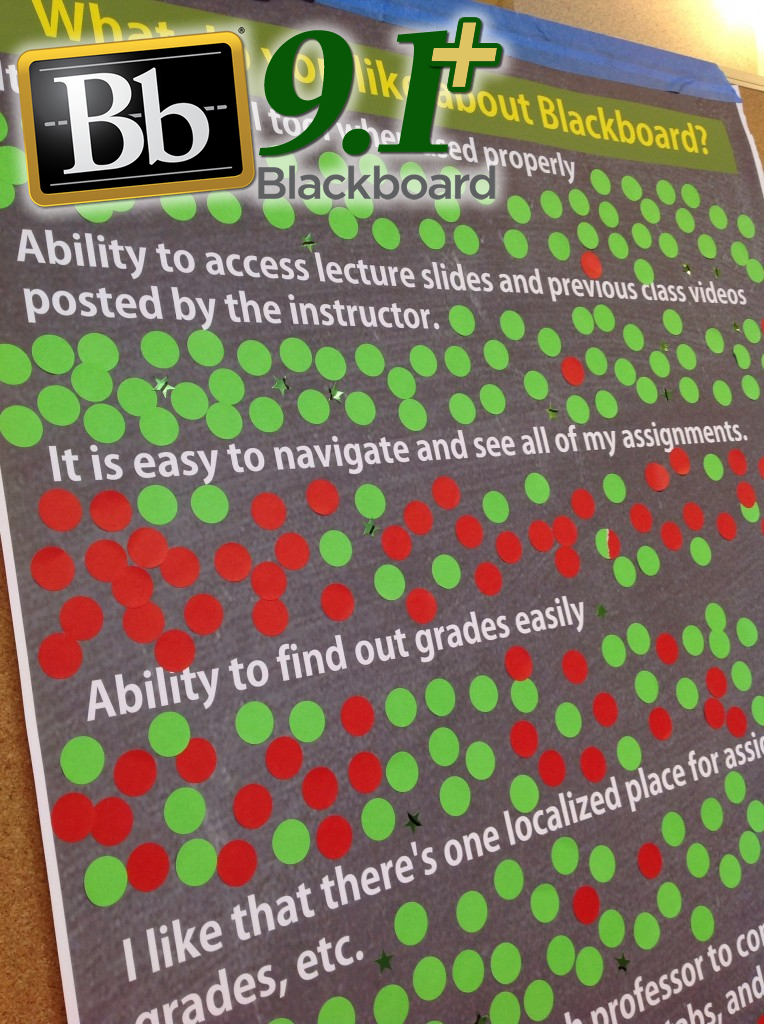 Educational Technology recently conducted some open forums (Sep 4 and Oct 2, 2013) with students and faculty regarding how useful Blackboard is as a Learning Management System. These open forums provided EdTech with a great deal of interesting feedback.
Among the feedback we received from students was the idea that Blackboard is difficult to navigate and it’s hard to find content/assignments. Fortunately, this issue can be resolved by adopting some “best practices” in organizing content in Blackboard. EdTech is not pointing fingers at any particular faculty members, but some do take a somewhat “scattered” approach when uploading content to Blackboard. Students then become frustrated because they do not see what they are expecting to see when they enter the course. And the instructor may not provide a sufficient “road map” or guide in navigating the course.
EdTech has some simple, common-sense guidelines when setting up a course. By default, EdTech provides a very basic structure to a course with a “Content” course button and an “Assignments” course button, but instructors should not feel limited to only using these buttons. Instructors are always free to create their own buttons and can customize the course in nearly any way they can imagine. Instructors can also delete existing buttons and totally remake the course menu.
IMPORTANT: Do NOT delete the Tegrity Classes button! If you do, then it is very difficult to add that button back into the course.
No matter how the course is structured, it must still make sense to the consumer of the course (i.e., the student). Below, we present two of the most common approaches to setting up a course: by date or by subject matter. Whichever one you choose, EdTech HIGHLY recommends including a “START HERE” button or something similar in the course menu which can include such content items as a syllabus, but should also include a detailed description of where students can find everything in the course. It is especially important to include this information if you will be providing students with content on an “as needed” basis via adaptive release rules for tests/quizzes/weekly content updates. Then there will be fewer surprises for students and fewer questions for the instructor.
Structure the course by DATE / WEEK
Do you want the course to be organized by Date/Week? This is one of the more common ways to structure a course and is often how material is presented in a course. Each week, the students have a set of concepts they are expected to learn and activities they are expected to complete. One of the most efficient ways to set this is up is to use weekly folders inside of Blackboard. Each weekly folder should contain all of the activities for the week, including any assignments that have been added using Blackboard’s Assignments tool.
Advantages:
- If folders are labeled as “Week 1”, “Week 2”, etc., then it is easy to recycle content from semester to semester using the Course Copy tool. Of course, if the folders contain date-specific materials (e.g. tests that may have adaptive release rules set to certain dates/times), then that will have to be updated after the course copy.
- All content (both conceptual materials and assessments) can be contained in one location making it easy for students to see at a glance what they are expected to accomplish each week.
- The main folder for the weekly content can—and should—include a description of the materials inside of the folder. In addition, a content item inside the folder can be placed at the top of the list of folder contents describing what students will accomplish inside of the folder.
Disadvantage:
- It may not be as obvious what material is contained inside of a weekly folder. However, this can easily be overcome by adding a more descriptive title to the folder: “Week 1 – Introduction to Limits” for a calculus course, for example. When the folder is created, the Text field can include even more information summarizing what students are expected to know when they complete the folder. This has the added benefit of giving students the objective for the content inside the folder, which is something EdTech always recommends.
Structure the course by SUBJECT MATTER (or unit / chapter, if you prefer)
As with setting up a course by DATE, you can use folders for each conceptual idea inside of your course. For purposes of this discussion, a calculus course will be used (though this will not actually follow any existing calculus courses on campus). One calculus textbook has the following chapters (and several other chapters beyond these):
- The Cartesian Plan and Functions
- Limits and Their Properties
- Differentiation
- Applications of Differentiation
- Integration
- Logarithmic, Exponential, and Other Transcendental Functions
- Applications of Integration
- Integration Techniques, L’Hôpital’s Rule, and Improper Integrals
Each chapter has several sub-sections. One way to organize the content would be to simply follow the textbook and create a folder for each chapter with sub-folders for each section. Each section folder would then contain all of the conceptual information (e.g. PowerPoint slides, lecture notes, etc.) along with any online assessments, if applicable (quizzes, tests, or assignments).
Another way to organize the folders might be as follows:
- Fundamentals of Calculus (contains the first 2 chapters of content/assessments)
- Differentiation
- Applications of Differentiation (sub-folder)
- Transcendental Functions and Differentiation (sub-folder)
- Integration
- Applications of Integration (sub-folder)
- Transcendental Functions and Integration (sub-folder)
- Integration Techniques, L’Hôpital’s Rule, and Improper Integrals (sub-folder)
This is the same amount of content, but arranged slightly differently in that one chapter (Logarithmic, Exponential, and Other Transcendental Functions) has its sections distributed between the folder on Differentiation and the folder on Integration as that chapter contains sections relating to each concept. Each folder and sub-folder would contain any materials that apply to the conceptual content (PowerPoint slides, lecture notes, and assessments).
Many, if not most, courses could be easily structured in a similar fashion so that related concepts are grouped together.
Advantages:
- By grouping related concepts together (even if they are not grouped that way in a textbook), the relationship between those concepts can be reinforced in students’ minds.
- As with organizing content by date, it is relatively easy to copy a course structured by subject matter forward to the following semester.
Disadvantage:
- It does take some deep thought and planning to set up a course in this fashion. You have to take into account all of the activities students will be required to complete for each of the subject matter concepts. If you are using a textbook with your course, then you will have to make sure that your organization of conceptual material “makes sense” in context with the textbook, especially if you will be skipping around a bit.
There is an alternative method for organizing content, no matter which pattern you choose to use (by date or by subject matter). You can use Learning Modules in Blackboard to also organize content. It takes a little more work to set up learning modules, but you can definitely use them to your advantage to guide students through your course. It is fairly easy to set up learning modules such that students must progress through the module viewing only the content you want to them to view instead of looking at all of the content at once. One of our eFellow instructors has set up her course this way to guide students through her blended course. This is especially convenient for her as she isn’t even on campus teaching the course (she teaches the course remotely from out of state).
Finally, there is one more trick to helping organize your course. You can use Document Packages to quickly upload a set of folders and files into Blackboard. This won’t help if you are using the Assignments tool or online quizzes (both assignments and quizzes have to be set up within the Blackboard environment), but you can easily upload lecture notes and supplementary materials into a course and have it all nice and neat. Basically, you create a folder structure on your local machine that mirrors what you would like to see in your Blackboard course. You then package the content into a ZIP file. And you use Blackboard’s Document Package uploader tool to import the ZIP file into Blackboard, which unpackages the file and sorts the content according to its original
Whichever method appeals to you, Educational Technology has the knowledge and experience to help you organize your course. Feel free to contact us if you have any questions about organizing your course. You can also attend our weekly EdTech U, which occurs every Thursday during the semester in IDE Room 105 from noon to 2 p.m. (the day of the week may change depending on the semester).
]]>Associate Teaching Professor Dee Leach – Mathematics and Statistics
 Several new resources involving technology aimed at improving student success and course availability have been implemented for the Missouri S&T Math 22 (Multivariate Calculus) course. These resources were created and implemented in support of the Missouri S&T Strategic Plan and the Calculus course redesign initiative. One of the resources involves delivery and recording of multivariate calculus classes via the Tegrity application. The lecture/discussion from one section of Math 22 are delivered and recorded on a daily basis using Tegrity. These lectures/discussions are used synchronously by some students who are not physically present in the classroom. Other students use the recordings in an asynchronous manner as review or supplemental material in support of learning the subject matter. The recordings are made available to all 330+ students enrolled in Math 22 at Missouri S&T. Initial feedback from students has been overwhelmingly positive. There have been over 200 viewings of the recordings in the first week. Of equal importance, the students who are in the room while the class is being recorded report no degradation of their classroom experience.
This resource makes use of technology that is both currently-available and well-known on the Missouri S&T campus. The system has proven to be very stable, “low overhead” and easy to use for students and instructor alike. The challenge in this implementation has been the necessity of the instructor to use a doc cam rather than a blackboard as the writing medium. Mathematics classes are not well-suited for pre-fabricated presentations (e.g., PowerPoint). This is because it is very difficult or impossible to “walk” students through a proof or problem solution that has been written out in advance. Thus, a large amount of writing on the part of the instructor occurs during these classes to help students to focus on the techniques being used. Unfortunately, this is independent of the mode of instruction (lecture, discussion) and it a major reason why a lot of mathematics instructors prefer large spaces (blackboards/whiteboards) over an 11×17 piece of paper on which to show proofs, problem-solving methods, and worked examples of problems. Asking a mathematics instructor to go from using a blackboard (large medium) to a doc cam (little piece of paper) is tantamount to asking that instructor to change her teaching style that she perhaps has spent her entire career honing to a fine art.
I am fortunate in that no one asked me to change anything; I made the decision to try the new approach (doc cam) with the idea that I could always go back to the blackboard if something unacceptable resulted from the change. As it has turned out, I have found that, personally, I can deliver my lecture/discussion/problem demonstration/recitation using a doc cam and I can do this as effectively as I can do these things with a blackboard/whiteboard. Surprisingly, it did not take long at all (a couple of days) to adjust from one medium to the other. One aspect I find uncomfortable with using the doc cam is that I feel “chained” to the podium. My style is to walk back and forth as I write on the board and sometimes walk forward into the classroom seating area to interact with students. I find that I am generally unable to do this with the doc cam. One concern I had in the beginning was whether it would take additional time to write things on the small piece of paper because of neatness and readability concerns. As it has turned out, my recorded lecture covers the same material as my later non-recorded lecture within 2-3 minutes either way. Another concern I continue to have involves the impact (if any) on the students in the classroom with me during the classes that are recorded. A promise I made to these students was that their experience would not be degraded or sacrificed in the name of “technology” or “progress”. To address my own concern, I continually keep these students in the decision-making loop regarding such things as lighting in the room, color and size of pen to use, how fast/slow I’m conducting the class, etc. I am fortunate in that I typically develop very good rapport with my students who are comfortable with giving me direct feedback on all aspects of the classes I teach and based on their suggestions (and concurrence) I have made modifications more or less “on the fly” as to how I present the material.
The implementation of synchronous delivery and recorded lectures for Math 22 has been relatively painless and trouble-free. Students were, and continue to be, involved in the decision-making process and I believe that this is absolutely critical to the success of any strategic initiative implementation directed at students. The transition from blackboard/whiteboard to doc cam for me was not huge as I discovered that many of my concerns quickly became non-issues. In the future, I believe that the level of success for others in transitioning from one writing medium to another will be highly dependent on the individual instructors, their preferences, their skills and abilities, and their respective teaching style.
]]>When I started working at S&T over six years ago, my first assignment was to “make Blackboard better.” As an educator my first question was, how did Blackboard affect teaching and learning? I started working with instructors across campus, trying to understand their needs and whether Blackboard met or did not meet those needs. Over the years, we have added different third party products in order to provide more functionality, but the overall question remains, Does Blackboard meet the teaching and learning needs of our campus?
About a year ago we began to evaluate all the tools used in teaching and learning on our campus (we call this our Learning Technology Portfolio). The objective was to see if we had any gaps or overlaps in our tools. We wanted to make sure we were spending the money allocated for teaching and learning in the best possible way. At the end of last year we had one item left to evaluate in the portfolio: Blackboard. Do we or don’t we review? Many schools wouldn’t because it gets everybody excited on campus and it is labor intensive. We decided that to truly evaluate our portfolio and be fiscally responsible we had to do a review.
Our objective with the Blackboard review isn’t to change to something different. Our objective is to identify the needs of our campus for a learning management system (like Blackboard) and meet those needs as effectively as possible. We put together a committee of instructors and students. We started a survey and have hosted two open forums. The focused purpose is to determine what our campus needs from an LMS in order to help in the teaching and learning mission of our university. The committee will analyze the information gathered from the survey and open forums and formulate a scoring guide or rubric that identifies all of the requirements for a learning management system. Using the scoring guide, we will score Blackboard to determine how it measures up to the needs of our campus. The committee of instructors and students will recommend what the next steps are. That decision will be what drives the next steps. We want to make sure the students and instructors at S&T have the best possible technologies available for teaching and learning.
We want to hear from you. If you didn’t have a chance to take the survey or attend the forums, you can send an email to me at hammonsa@mst.edu.
–By Angie Hammons; posted by Joshua Woehlke
]]>Here’s an example set of guidelines to get you started:
1. Only post things that you would want everyone to know.
Ask yourself: Is this something I want everyone to see?
2. Do not share personal information.
Ask yourself: Could someone find me based on this information?
3. Think before you post.
Ask yourself: What could be the consequences of this post?
4. Consider your audience.
Ask yourself: Who is going to look at this, and how are they going to interpret my words?
5. Know how to give constructive feedback.
Ask yourself: Will this post help or hurt others?
6. Stay on topic.
Ask yourself: Does this post contribute to the discussion or distract from it?
7. Always cite media from other sources.
Ask yourself: Who is the original creator of this work?
Adapted from Kim Cofino’s “always learning,”
Cofino, K. (2009, September 6). [Web log message].
Retrieved from http://kimcofino.com/blog/2009/09/06/student-blogging-guidelines/ ]]>
We here in Educational Technology (EdTech) are always excited with new technologies become available, but timing is often a critical issue for us. In this case, Pearson announced the release of their building block just before the beginning of the semester before we had a chance to thoroughly evaluate it.
Whenever new learning technologies are released on campus, we here in EdTech take three things into consideration:
- First and foremost, it must pass a thorough security audit to ensure that confidential student and faculty information is not compromised and that the integrity of the network will not also be compromised. We take both issues very, very seriously.The Pearson building block so far has not passed this first test to our satisfaction.
- New technology must also be tested to ensure that it will work well with the other technologies that have been installed on campus. This is often a very challenging process, but in most cases we are able to find an acceptable solution.Again, the Pearson building block for Blackboard does not meet our expectations for how well the technology will work from inside Blackboard.
- Finally, EdTech staff needs time in order to become familiar with the technology ourselves. We will not be able to provide adequate support to our campus community unless we have a thorough understanding of how the technology works, including any potential quirks. Our general preference is to have the technology made available to us (EdTech) in our development environment in the semester prior to its deployment to the production environment. In practice, this means that we want access to the technology in the Spring semester if it will be used in the Fall. This gives us the opportunity to test the technology, learn how it all works, and use the Summer semester as an early-adopter phase for some instructors.Once again, Pearson Education has not been able to meet this simple requirement despite our repeated requests.
Our commitment in Educational Technology is to provide the instructors we support with the best possible experience we can with the technologies that are available. Only when technology has met the three basic requirements above do we feel comfortable supporting it for the campus.
As always, we welcome all feedback from our campus community on this or any other educational technology issue.
]]>