Learn more about AAC&U’s Project Kaleidoscope and the 2017 Active Learning Day
How can you participate in active learning?
- Spend at least 10 minutes implementing a culturally responsive STEM teaching strategy that promotes active learning in your classroom (Culturally Responsive Teaching is a pedagogy that recognizes the importance of including students’ cultural references in all aspects of learning);
- Identify innovative ways to deepen and extend your departmental/institutional commitment to inclusive STEM higher education reform throughout the week, academic year, and beyond;
- Tell a friend! Reach out to at least one colleague (in either a STEM or non-STEM discipline), and engage in dialogue around what they can do to implement similar strategies in their classroom;
- Tweet or post on social media about your participation using #ActiveLearningDay2017; and
- Share with others what you did on Active Learning Day by creating and uploading a two-minute video! Upload the video to YouTube and send us the link at pkal@aacu.org. We will showcase your effort on STEM Central.
Interested in participating and/or need help with making a video? Contact EdTech@mst.edu to schedule a videographer to stop by your classroom while you engage your students in an active learning exercise!
]]>
On our campus, plagiarism is defined by the UM Collected Rules and Regulations (200.010 – http://www.umsystem.edu/ums/rules/collected_rules/programs/ch200/200.010_standard_of_conduct) as “The term plagiarism includes, but is not limited to: (i) use by paraphrase or direct quotation of the published or unpublished work of another person without fully and properly crediting the author with footnotes, citations or bibliographical reference; (ii) unacknowledged use of materials prepared by another person or agency engaged in the selling of term papers or other academic materials; or (iii) unacknowledged use of original work/material that has been produced through collaboration with others without release in writing from collaborators.”
Missouri S&T is very strict with our students, and the university has set up sanctions for these actions depending on their severity. But what about when plagiarism happens in “real life?” Are there consequences? In short, yes—and they’re often far more serious and long-lasting than a simple failing grade. In “real life”, plagiarism can result in a loss of trust and professional status, which can have a very real impact on one’s livelihood. Even in cases of unintentional plagiarism the process to correct a non-citation can be long and painful. I recently talked with an instructor on our campus who had just gone through an experience where her work had been co-opted by another author.
Dr. Kate Sheppard is an instructor on our campus for the History and Political Science department. She works hard as an instructor and a researcher. She is always working to know about her area of specialization and interest so that she can continue to publish papers, give talks and write her next book. She was excited when she found what she thought was a new article on Margaret Murray. She was shocked when she realized that there was nothing new in this article but that the author had taken Dr. Sheppard’s own book and other papers and put them in a condensed form in this article. It’s not word- for-word copying but if you look at our definition of plagiarism, isn’t that what this author did?
Technology makes our lives easier every day and it is incredibly easy to find the authors of papers and books today, many of whom are very happy to collaborate with you and help further the academic pursuit of a topic that they may be very passionate about. Instead, Dr. Sheppard spent many hours trying to clear this issue up. All she wanted was credit for her thoughts and ideas. Here is a link to her original blog post about what happened to her. https://doctorkate.wordpress.com/2015/11/02/the-forgotten-citations-and-the-third-wave-feminist-and-scholar-who-really-wrote-them/
Dr. Sheppard was able to work with the publisher to get the issue resolved. The publisher edited the online article to give credit to Dr. Sheppard where it was due. That’s what Dr. Sheppard had asked for along. Here is Dr. Sheppard’s update on this issue. https://doctorkate.wordpress.com/2015/11/04/the-forgotten-citations-a-resolution-from-broadlyvice/
When we are working with students and colleagues we need to let them know that plagiarism—even unintentional plagiarism—is wrong. Unless otherwise stated, thoughts, ideas, conclusions based on research belong to the person who did the work and we should honor that with the correct citations. Give credit where it is due.
Written in collaboration with Raz Kerwin.
]]>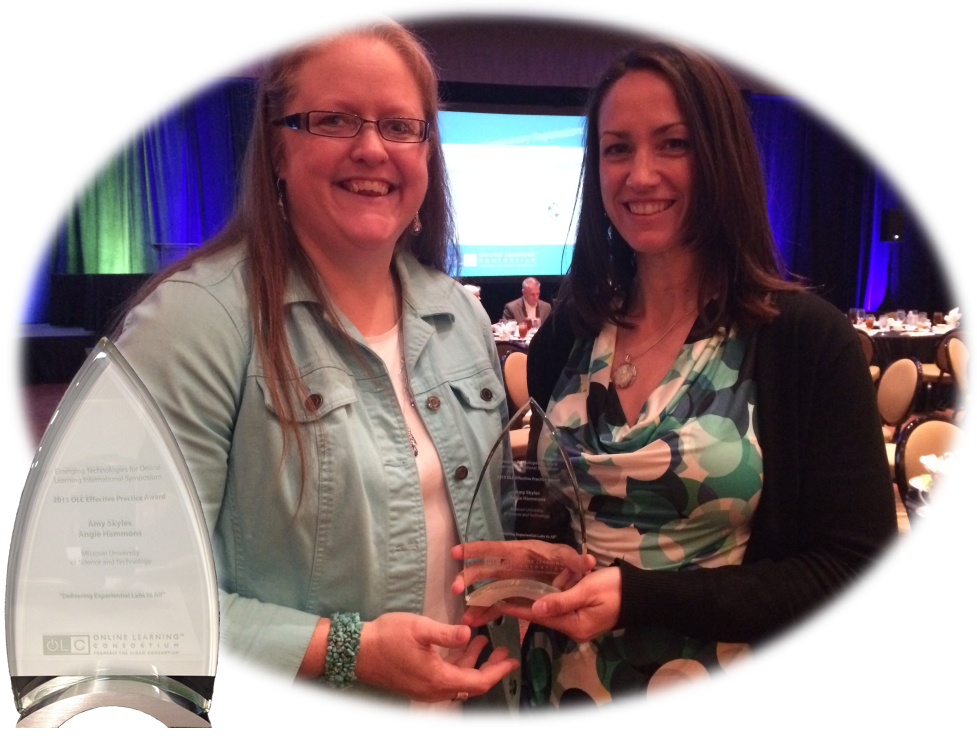
Angie Hammons (left) and Amy Skyles (right) pose with their Online Learning Consortium Effective Practice Award 2015.
Angie Hammons, Manager of Educational Technology at Missouri S&T, and Amy Skyles, an Instructional Designer for EdTech recently accepted the 2015 Sloan-C Effective Practice Award from the Online Learning Consortium. They received the award for their project on Delivering Experiential Labs To All (DELTA).
DELTA is a set of eLearning models, processes and strategies for redesigning traditional (on-campus, in-class) labs to a blended or fully online model. Several instructors, with help from Amy and Angie, have embraced this model in fields including biology, chemistry, circuits, materials testing, and nuclear engineering.
Congratulations to Amy and Angie for their hard work and effort!!
]]>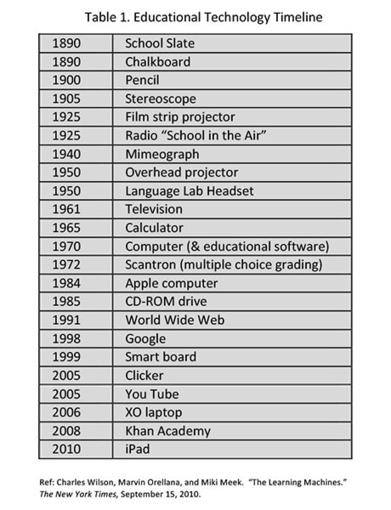
The educational tools that we choose often shape how we educate our students, so let’s choose them wisely with one eye on the future.
Source: www.edutopia.org
This same concept applies to a lot of lab courses. There’s some big machine which drives the lab activity because it’s there, we’ve paid for it, and it’s all we know. Don’t let the tools that we have limit the way we think about teaching.
]]> In this blog post I’ll discuss how to set up a Google Doc, as well as relate some classroom best practices for this type of collaborative online exercise, including how to get students started, how to constructively guide the editing session, and how to ready the finished rubric for use. (NOTE: You will need to have a Google Apps for Education account in order to use Google Drive. Instructions for syncing your S&T account with Google Apps for Education can be found here.)
First things first – Getting your class onboard with the importance of rubrics
As an instructor, your students will tend to follow your lead. They might not always be paying attention to the material, but I promise that they are keenly aware of you and how you run your class. If you consistently use rubrics for grading, peer review, and formative development of assignments, your students will quickly realize that rubrics play an important role in determining their grades. After a short while, students who have been paying attention to how you teach will begin to expect a rubric to appear with each new assignment. This is exactly what you want to happen. Most people (students included!) are looking for an advantage; when students realize that they have the chance to develop an assignment rubric and directly affect the way their assignments are graded, you’ll have the student buy-in you need to make a collaborative rubric-building session a success.
Setting up the Google Doc for use
First you’ll want to set up a blank Google Doc that will become the rubric. To begin, navigate to http://drive.google.com. Click the Create button and select “Document” from the drop-down list. This will create a new, empty Google Doc. Next, to make a rubric, you’ll need a table. Click the Insert tool, select “Table” from the drop-down list, and define an appropriate sized table for your rubric. The intended dimensions of your rubric will, of course, dictate the table size. 5×5 is a common size, but the table can always be later expanded or contracted as needed.
At this point you have created a document, but before it is ready for use the document must be shared and have full editing permissions set for users. To share the document, click the Share button in the top right-hand corner of the workspace. This will open the “Sharing settings” dialog box. Under the “Who has access” option, select the Change button, and then select the option Anyone with the link. This setting will allow anyone with the link to access the document. To allow anyone with the link to edit the document, change the Access drop-down option from “Can view” to “Can edit.”
To be (anonymous), or not to be
At this point, you’ll need to make a decision about whether you want to allow your users to be anonymous or not. If you want to mandate that students use their identities when collaborating in Google Docs, you’ll have to send students the document link in their email accounts; this can be done by using the “email all student users” tool in Blackboard. Since students use Gmail to access their email, they will already be automatically signed into all other Google services, including Docs. If you want to allow students to collaborate anonymously, simply post the link to the Google Doc in Blackboard.
Mandating that users have an identity within the Google Doc is optional; signing into the Google Doc can promote accountability, but anonymity often allows for creative freedom. In my experience, anonymity of users does not hamper the collaborative process, provided that the instructor is present and providing a moderating influence. It’s true that some students may use this anonymity to post something silly for the amusement of the class, but as an instructor it’s up to you to discourage this type of behavior. In my experience, once the initial novelty wears off, the silliness does too. Again, your students will tend to follow your lead; if you’re serious, they’ll be serious.
Getting students started
Now you have a Google Doc, and presumably, a room full of students just raring to collaborate. To get started, consider “seeding” the rubric with the learning dimensions you want to assess, and the categories into which they will be assessed. This will be dictated by the subject material. For example, in an undergraduate-level technical writing class, the learning dimensions could be items such as formatting, organization, grammar, mechanics, and reader effect. The assessment categories used will vary depending on how you want to score assignments, whether it is from weak to strong, letter grades, or some other assessment criteria. In my experience, students will have the clearest direction if you provide the initial dimensions and assessment categories; the instructor provides the framework, and the students provide the spectrum of what makes an assignment submission “good” or “bad.”
Constructively guiding the editing session
As students collaborate on the document together, you’ll need to monitor their work and provide guidance. Many students will be new to writing a rubric, and will often use very generic and insufficiently descriptive terms. For example, in a technical writing rubric intersection of “formatting” and “weak”, students may initially put something very general, such as “poor formatting.” When this happens, use it as a teaching moment. Challenge your students to come up with specifically descriptive criteria. Ask them what qualities, specifically, make for poor formatting in a document. How will we know when we see poor formatting? What are the tell-tale signs? Remind them that opinions are often subjective and fluid, but that student grades should be based on objective standards and identified best practices. Remind them to consult the textbook or lecture notes, if needed. Challenge your students to put themselves in the place of an evaluator; an assignment doesn’t get graded as “weak” because an evaluator simply knows a weak assignment when they see one, an assignment is graded as “weak” when it fails to meet specific criteria. Ensure that your students are identifying these specific criteria across the spectrum from “weak” to “strong.” This may take some instructional prodding and questioning along the lines of playing Devil’s Advocate or using the Socratic Method, but providing this type of instruction is crucial to the success of the activity.
Readying the finished rubric for use
When the student-created rubric is proclaimed to be “done”, you’ll need to do some basic version control. You can either “freeze” the document by rescinding editing permissions, or you can download a static copy of the document onto your own machine. The purpose of this step is to ensure the integrity of the original classroom-generated document; doing so will also help preclude any malicious or humor-based editing of the document. There is an old administrative saying that goes “Trust, but verify.” In this situation, you’ve done the trusting part, but now you have to do the verification part.
After some minor copyediting and educational quality control, you should have a functional and useful rubric that was created almost entirely by your own students. Obviously, as the instructor you have the final say about the rubric; that’s a given. But when you involve students in the creation of assignment rubrics, you’re doing something profound. You’re demonstrating and reiterating to them in a very real way that the tools for success reside in their own hands. You’re empowering your students to take ownership of the measures of success and failure; instead of students being passive agents who are simply acted upon in your classroom, you’re turning them into active and engaged scholars with the ability and means to control their own academic destinies. And, in all probability, your students will enjoy using a powerful multi-author collaborative tool such as Google Docs to generate a document—it really is kind of cool to see so much cognitive activity happening all at once on a single page!
]]>There is a wide consensus among educators that rubrics can be very useful tools. For instructors, rubrics often enable rapid student assessment and standards-based grading as well as reinforcing learning objectives and helping to standardize a course curriculum. For students, rubrics can be a useful tool for providing formative guidelines for assignments while—ideally—spurring reflection and self-assessment.
Rubrics can do wonderful things for students, but only if students actually look at the rubric, understand it, and use it. Many instructors have had the experience of passing out a rubric only to see students quietly file it away never to be seen or thought of again, or even worse, have seen their students throw away the rubrics en masse as they leave the classroom. Clearly, this is an ineffective use of a rubric. So how can instructors ensure that students both know about the rubric and that they will be more likely to use it when drafting an assignment?
One way to promote rubrics is to have students collaboratively build the rubric themselves.
People (yes, undergraduates are people too!) often do not value that which has been freely given; however, people tend to highly value what they have worked for. In my experience as an undergraduate-level technical writing instructor, students who were empowered to create an assignment rubric typically become much more interested in that document as a useful and advantageous tool.
Of course, as an instructor, you have to carefully guide this process in order to end up with a usable rubric that accurately reflects the effort and complexity surrounding the subject material. Having students develop their own assignment rubric is not often a day one activity; the first step is imparting a working body of knowledge. You will be asking students to descriptively evaluate what makes a “good” or “bad” assignment submission, and students must collectively possess the domain knowledge required to make these judgments. However, as students get to the point where they have a working knowledge of a subject and realize that they are able to determine their own assignment scores based on previously-agreed upon metrics, a rubric becomes a powerful tool for students to use when completing an assignment.
One particularly powerful tool for facilitating collaborative rubric-building is Google Docs. Google Docs is a multi-author online collaborative document space. In this environment, up to 50 people can simultaneously edit a document. As you might imagine, a live document with 25 editors can quickly become very chaotic. But, if this chaos is constructively controlled, the end result can be quite amazing; students typically draft along parallel lines of thought, build upon each other’s work, make corrections, and ultimately select the “best” version of work, all in real-time. The end result is often a very high-bandwidth human discussion about the classroom subject material wherein metrics for success and failure are critically engaged by students; you’ll also end up with a student-created rubric that (very likely!) closely parallels your own original rubric. The most key difference is that now students are full stakeholders in the rubric. They’ll know exactly what a rubric is, what it’s good for, and how to use it. After all, they created it.
In the next blog post I’ll discuss how to set up a Google Doc, as well as relate some classroom best practices for this type of collaborative online exercise including how to get students started, how to constructively guide the editing session, and how to ready the finished rubric for use.
]]>