 Panopto lecture capture services released a mandatory update of their recorder software on July 20. All classrooms and CLCs have been updated with the newest recorder.
If you have not updated the software on your office or personal computer yet, then EdTech highly recommends doing so.
You should be prompted to update the software when you attempt to create a recording.
You can also obtain the update simply by re-installing the recorder software.
If you need assistance, contact the IT Help Desk at 573-341-HELP or help.mst.edu
]]>On the technology front, we’re supporting the IT department as they work on the continuing rollout of Windows 10 & Office 2016 in classroom computers around campus. In our own technology portfolio, we’re sundowning the Tegrity lecture capture tool in favor of another tool called Panopto, and we’re upgrading to the latest Turning Point software release.
We’ll be in touch as these projects mature, and as the Fall semester gets closer. Have a happy and productive summer!
]]>
 IMPORTANT! Please read the following message VERY carefully!
Educational Technology (EdTech) will be purging ALL course sessions stored in Tegrity at close of business on Friday, May 26, 2017.
Missouri S&T’s usage agreement with Tegrity limits us to only 500 hours of recordings per semester. This means we MUST remove all recordings from Tegrity at the end of each semester in order to ensure we have enough space available for recordings in the next semester.
WHAT THIS MEANS FOR YOU:
If you used Tegrity lecture capture to record your class sessions, those recordings will be removed permanently from Tegrity’s servers. This includes any recordings in your private course. All Tegrity users are given a private course in addition to their regular courses (listed as “ Private Course” in the course list inside of Tegrity).
If you would like to maintain any recordings (for archival purposes), the link below shows how to download the recordings for storage:
http://edtech.mst.edu/support/tegrity/downloadrecording/
NOTE: In previous semesters, it was possible for instructors and students to “subscribe” to a Tegrity recording as a podcast through iTunes. The current version of Tegrity is apparently having difficulty interfacing properly with the most recent versions of iTunes. This means that iTunes no longer downloads the Tegrity recordings properly.
Any instructor who would like assistance in backing up their Tegrity recordings is strongly encouraged to contact the Help Desk at 573-341-HELP or online at help.mst.edu. EdTech will be glad to provide that assistance.
More information about Tegrity lecture capture can be found at:
]]> Do you plan to use Tegrity lecture capture during FALL 2014?
If so, then Educational Technology will need to gather some basic information from you so that we may prepare any room(s) in which you will be teaching with the appropriate technology.
To gather that information, we ask that you complete the survey linked below:
Tegrity Lecture Capture Information Survey
(This survey will expire at midnight on Friday, May 23)
This survey will ask you in which rooms you will be teaching and will also ask which technology (audio or video) that you will need. NOTE: Several rooms are already equipped with Tegrity technology.
If you want to find out more information about Tegrity, please visit the EdTech web page below:
http://edtech.mst.edu/support/tegrity
For assistance with Tegrity-related issues, please contact the IT Help Desk at 573-341-HELP or online at help.mst.edu.
]]>If you are an instructor who created a recording during the outage and it has not uploaded by this afternoon, please submit a ticket so that Educational Technology can manually upload your recording.
Thank you for your patience!
]]>Until Tegrity service is restored, all Tegrity videos will be unavailable for viewing and starting a new recording through Blackboard will not be possible.
If you are an instructor who needs to record a class, this is still possible by double-clicking the Tegrity tray icon, selecting your course, and starting a recording.
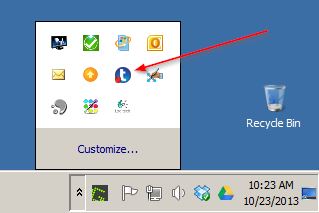
Please be aware that the recorder will take several minutes to start while it attempts to contact the service and the recording will not be uploaded until service is restored. Your recording will be stored safely on the local hard drive.
More information will be shared as it becomes available.
]]>Associate Teaching Professor Dee Leach – Mathematics and Statistics
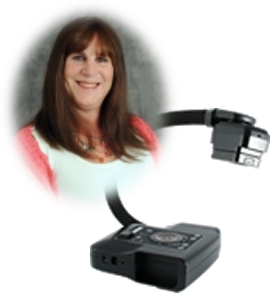 Several new resources involving technology aimed at improving student success and course availability have been implemented for the Missouri S&T Math 22 (Multivariate Calculus) course. These resources were created and implemented in support of the Missouri S&T Strategic Plan and the Calculus course redesign initiative. One of the resources involves delivery and recording of multivariate calculus classes via the Tegrity application. The lecture/discussion from one section of Math 22 are delivered and recorded on a daily basis using Tegrity. These lectures/discussions are used synchronously by some students who are not physically present in the classroom. Other students use the recordings in an asynchronous manner as review or supplemental material in support of learning the subject matter. The recordings are made available to all 330+ students enrolled in Math 22 at Missouri S&T. Initial feedback from students has been overwhelmingly positive. There have been over 200 viewings of the recordings in the first week. Of equal importance, the students who are in the room while the class is being recorded report no degradation of their classroom experience.
This resource makes use of technology that is both currently-available and well-known on the Missouri S&T campus. The system has proven to be very stable, “low overhead” and easy to use for students and instructor alike. The challenge in this implementation has been the necessity of the instructor to use a doc cam rather than a blackboard as the writing medium. Mathematics classes are not well-suited for pre-fabricated presentations (e.g., PowerPoint). This is because it is very difficult or impossible to “walk” students through a proof or problem solution that has been written out in advance. Thus, a large amount of writing on the part of the instructor occurs during these classes to help students to focus on the techniques being used. Unfortunately, this is independent of the mode of instruction (lecture, discussion) and it a major reason why a lot of mathematics instructors prefer large spaces (blackboards/whiteboards) over an 11×17 piece of paper on which to show proofs, problem-solving methods, and worked examples of problems. Asking a mathematics instructor to go from using a blackboard (large medium) to a doc cam (little piece of paper) is tantamount to asking that instructor to change her teaching style that she perhaps has spent her entire career honing to a fine art.
I am fortunate in that no one asked me to change anything; I made the decision to try the new approach (doc cam) with the idea that I could always go back to the blackboard if something unacceptable resulted from the change. As it has turned out, I have found that, personally, I can deliver my lecture/discussion/problem demonstration/recitation using a doc cam and I can do this as effectively as I can do these things with a blackboard/whiteboard. Surprisingly, it did not take long at all (a couple of days) to adjust from one medium to the other. One aspect I find uncomfortable with using the doc cam is that I feel “chained” to the podium. My style is to walk back and forth as I write on the board and sometimes walk forward into the classroom seating area to interact with students. I find that I am generally unable to do this with the doc cam. One concern I had in the beginning was whether it would take additional time to write things on the small piece of paper because of neatness and readability concerns. As it has turned out, my recorded lecture covers the same material as my later non-recorded lecture within 2-3 minutes either way. Another concern I continue to have involves the impact (if any) on the students in the classroom with me during the classes that are recorded. A promise I made to these students was that their experience would not be degraded or sacrificed in the name of “technology” or “progress”. To address my own concern, I continually keep these students in the decision-making loop regarding such things as lighting in the room, color and size of pen to use, how fast/slow I’m conducting the class, etc. I am fortunate in that I typically develop very good rapport with my students who are comfortable with giving me direct feedback on all aspects of the classes I teach and based on their suggestions (and concurrence) I have made modifications more or less “on the fly” as to how I present the material.
The implementation of synchronous delivery and recorded lectures for Math 22 has been relatively painless and trouble-free. Students were, and continue to be, involved in the decision-making process and I believe that this is absolutely critical to the success of any strategic initiative implementation directed at students. The transition from blackboard/whiteboard to doc cam for me was not huge as I discovered that many of my concerns quickly became non-issues. In the future, I believe that the level of success for others in transitioning from one writing medium to another will be highly dependent on the individual instructors, their preferences, their skills and abilities, and their respective teaching style.
]]>On Wednesday, August 1, 2012, Tegrity Lecture Capture will be made available in ALL Blackboard courses.
Up until now, Tegrity was deployed to select courses based on instructor needs. After August 1, Tegrity will be available for all instructors to use in their Blackboard courses.
Tegrity allows instructors to record their lecture notes. Students can monitor and participate in the recording live, or review the recording later. Both instructors and students can add their own annotations to the recordings (even after the recording process is completed).
WHAT THIS MEANS FOR YOU:
- In order to use Tegrity to its fullest potential, you will need a webcam/microphone for the lecture capture.
- Contact EdTech by submitting a ticket through the Help Desk (573-341-HELP or online at help.mst.edu) and we will arrange for the classroom in which you are teaching to be properly equipped with technology.
- EdTech can also arrange to show you how the technology works in the classroom.
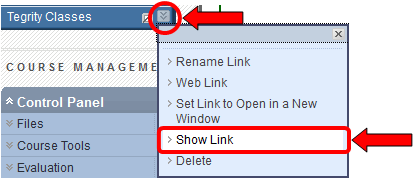
- A new Tegrity Classes button will appear at the bottom of the course menu.
WARNING: Do NOT delete this button. If you do, it may be very difficult to restore the button if you decide later you want to use Tegrity. Please leave the button alone if you do not intend to use Tegrity.
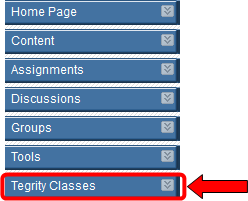
- If you do not want students to see the button, you can hide the link from students as follows:
- Click the drop-down arrow on the right-hand side of the Tegrity Classes button.
- Click Hide Link.
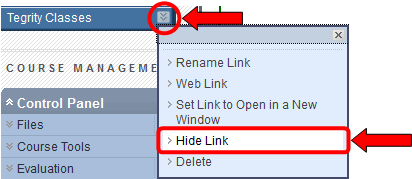
- A little gray square icon with a slash through it will appear on the Tegrity Classes button, indicating that the button is hidden from students.

- To make the button visible to students again, click the drop-down arrow on the right-hand side of the Tegrity Classes button and click Show Link.
Educational Technology will be conducting a series of Tegrity training sessions for all instructors interested in seeing what Tegrity is all about. Visit the link below to sign up for an available session!
For more information, contact Educational Technology at edtech@mst.edu.
Educational Technology is offering several opportunities to learn about Blackboard Collaborate in August (before Fall 2012). Collaborate is a virtual learning environment where students and instructors can interact online much as they do within a traditional classroom.
To sign up for a training opportunity, visit the link below:
Each training opportunity will cover the following:
- Uses (live class, record a class, virtual office hours)
- Features (white board, application sharing, web tour, changing permissions, chat, polling)
- Creating a new session
- Accessing recorded sessions
For more information, contact EdTech at edtech@mst.edu.
]]>
Educational Technology is offering several opportunities to learn about Tegrity Lecture Capture in August (before Fall 2012). Tegrity records an instructor’s lecture notes for later review by students. Both students and instructors can add annotations to the recordings.
To sign up for a training opportunity, visit the link below:
Each training opportunity will cover the following:
- When to use Tegrity
- Getting started
- Features
- Accessing recordings and publishing recordings for student view
- Advanced features
For more information, contact EdTech at edtech@mst.edu.
]]>