Canvas has published a mobile app meant for instructors called “Canvas Teacher”. Now you can keep track of several different aspects of your course from your mobile device. The Canvas Teacher app is available for both Android and iOS.
Announcements, Assignments, Discussions, Quizzes
The Canvas Teacher app lets you make announcements, browse and grade assignments, moderate discussions, and evaluate quizzes from within the app. The Canvas Teacher app is not meant to be a full replacement for your primary working computer, but rather to compliment your setup and to allow you the flexibility to communicate with students and to check submissions or give feedback when you’re on the go.
Give it a try..
In general, instructors are not heavy mobile users of Canvas. Our usage analytics indicate that less than 5% of instructors regularly interact with Canvas on a mobile device. Why is that? One likely reason is that the previous Canvas app was very student-centric, and instructors couldn’t do much but look at the course. That has changed—with the Canvas Teacher App you can now do many of the tasks you could normally do at your office computer on your smartphone.
]]>What are the key differences?
• Turnitin was made specifically for classroom use; its focus is on undergraduate-level student compositions and reports. Turnitin focuses on indexing and checking against the major journals, casual web sources, and other student-submitted papers from Missouri S&T and colleges around the country. Turnitin offers tools for student feedback and revision, and also allows for students to see their own originality report which has a formative benefit for them. Turnitin is integrated into the campus LMS (Blackboard), and there is no limit to the amount of papers that can be uploaded. Turnitin is primarily intended for undergraduate-level student work.
• iThenticate is not intended for classroom use; its focus is on theses, dissertations, and research articles for publication written by authors at or above the graduate-level. iThenticate focuses on indexing and searching against all accessible web sources and other published field literature not typically found on the casual web, and it has none of the classroom-specific features that Turnitin offers. iThenticate is a standalone web service, and is not integrated into the campus LMS. iThenticate does not allow non-account holders (i.e. undergraduate students) to see originality reports, because iThenticate is intended to be a confidential and formative document review tool for academic authors. iThenticate DOES NOT upload or index a copy of the document being checked. iThenticate is primarily intended for professional and higher-level academic work.
You can read a bit more about the differences between Turnitin and iThenticate here: http://www.ithenticate.com/resources/academic#compare
To use Turnitin, simply create a Turnitin assignment to which students may upload a file. You can find a tutorial here: http://edtech.mst.edu/support/blackboard9-1/createturnitin/
To use iThenticate, submit a request via the IT Help Desk ticketing system by calling (573) 341-4357, or visit http://edtech.mst.edu/support/ithenticate/ and fill out the online access form.
I hope this information will help save you time and aid your teaching and scholarly publication.
TL;DR – Turnitin is for undergraduate students, iThenticate is for graduate level and above authors
]]>
At Missouri S&T, the experiential experience is a top priority. That’s what drives students to a STEM school with an engineering focus in a small town in Rural Missouri that’s more than an hour…
Source: blog.sloanconsortium.org
Here’s a look at laboratory redesign projects going on at S&T. We’ve got several courses piloting now and others under development.
]]>The primary users of iThenticate are academic researchers and publishers, including graduate and doctoral students (and their advisors!) who are writing theses or dissertations. These writers will appreciate iThenticate’s easy-to-use interface as well as several features not found in Turnitin. iThenticate allows for much longer documents to be submitted, as well as allowing for document sharing and version comparison. Unlike Turnitin, iThenticate does NOT save a copy of submitted work to a central database. This means your in-progress publication will stay confidential until it is ready for publication.
If you are a scholarly writer interested in using iThenticate, please contact the IT Help Desk to submit an iThenticate access request to the Educational Technology office; The EdTech office will get you set up and also provide a short training session, if desired. Happy writing and publishing!
]]>This event is an open-attendance, free-form workshop. You can come when you want, stay for as long as you want, and leave when you want.
Workshop sessions will focus on:
- Using Learning Management Systems (e.g. Blackboard)
- Building Student Engagement (e.g. VoiceThread, Piazza, Google Apps, Clickers, etc.)
- Fostering Online Collaboration (e.g. Kaltura streaming media, Tegrity lecture capture, Adobe Connect, and Big Blue Button).
- S&Tconnect Early Alert replaces the current Academic Alert system and will be hosted by the Office of Undergraduate Studies.
EdTech staff will be available to assist you with any questions you may have about using EdTech-supported technologies. Have questions? We have answers!
The workshop schedule is listed below. Attend any or all as needed! No pre-registration required!
|
|
18 Aug |
19 Aug |
20 Aug |
21 Aug |
| 9 – 11 a.m. | S&Tconnect Early Alert |
Learning Management Systems | Online Collaboration | Student Engagement |
| 1 – 3 p.m. | Student Engagement | Online Collaboration | Learning Management Systems | S&Tconnect Early Alert |
For more information, contact Educational Technology at edtech@mst.edu or 573-341-4131.
]]>
Registration for the Teaching and Learning Technology Conference 2011 on March 10 and 11, 2011 is now OPEN!
Keynote Speaker: Dr. Eric Mazur — Balkanski Professor of Physics and Applied Physics at Harvard University and author of Peer Instruction: A User’s Manual.
Web-based registration is now available at:
http://edtech.mst.edu/events/tltconference2011/registration.html
If you have already registered with us via email, you do NOT need to register again. We still have your registration information.
Details about our conference can be found on the conference web site:
We look forward to seeing you at our conference in March!
]]>
I recently had the opportunity to demonstrate a variety of technologies that EdTech supports to several members of the faculty on campus. I put together a few presentations and gave them a brief overview of what we had to offer, based on a request from the department chair. EdTech would be more than happy to give other departments the same information through a technology demonstration or other forum.
Here is the sample technology that I demonstrated. Note that there are other technologies that we also support.
]]>SynchronEyes — Allows instructor to control/observe/share machines in a computer lab with the students.
TurningPoint/Clickers — Personal response devices (clickers) give students and instructors immediate feedback during lecture.
Clickers-TurningPoint-Overview.pdf
TurningPoint-Clickers-Introduction.ppt
Respondus — Test creation software that interfaces with Word and Blackboard to facilitate getting tests and other assessment tools online inside a Blackboard course.
Blogs and Wikis — Students can continue to learn and collaborate in an asynchronous learning environment, moderated by the instructor. Blogs and wikis are available in Blackboard.
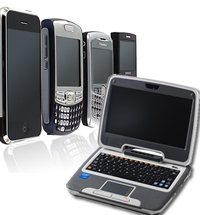 We here at EdTech Enterprises have recently been examining the possibility of using a “netbook” for some applications instead of heavier and more bulky standard laptop or tablet PCs.
However, I recently came across a couple of good articles that look at some of advantages and disadvantages of netbooks in comparison to other technologies.
Jeff Medcalf at the Eternity Road blog investigates whether netbooks are actually useful. He lays out his criteria in terms of the use cases and function points of the most widely used technology. Basically, each technology needs to match up what the technology can actually do (its function points) against what people actually want or need to do (use cases). We do this all the time in EdTech with faculty. In many instances we try to find out what an instructor wants to do and then try to find the appropriate technology to match that need.
Jeff examines desktops, laptops, netbooks, and smartphones and compares
how well each technology fulfills a user’s need to perform certain
tasks, such as voice communication, document creation, record keeping,
entertainment, and so forth. Jeff concludes that desktops and laptops
are “functionally identical for the vast majority of users.” The
primary advantage a laptop has over a desktop is portability while a
desktop often offer lower cost for the same amount of power.
Smartphones have certain advantages that desktops and laptops simply do
not offer yet (mainly high portability and superior voice
communication). Netbooks simply cannot do everything that a
desktop/laptop can do and they also can’t do everything that a
smartphone can do. In essence,
A netbook serves
essentially no purpose that is not served by one of the other devices
you must have in any case [i.e. a desktop/laptop or a smartphone —
ed.]. It is an extra, a luxury.
In his argument, Jeff links to a more colorful article by Joey Devilla
that tries to draw an analogy between smartphones/netbooks and apple
pies in the fast food industry. Specifically, he describes the
competition in apple pies between “Monarch Burger” [MB] (which has a
rather creepy mute monarch for its mascot) and “Jester Burger” [JB]
(which has an almost equally creepy clown in a brightly colored
jumpsuit as its mascot).
MB tried selling pies that looked
like homemade slices of apple pie, but didn’t really taste like one.
Having sampled them in the past, I would tend to agree that it was
never the best pie out there. However, MB was trying to set up the
expectations in customers’ minds that they were eating real homemade
apple pie, even when they weren’t.
In a similar fashion, a netbook is designed to mimic a laptop’s form
and function, even though it is not quite as powerful or as capable as
a true laptop. It also can’t quite match the portability and features
of a good smartphone, even though it may have some features that a
smartphone doesn’t have.
Joey extends the netbook analogy to include network computers, also known as “thin clients” that have a rudimentary operating system, but the bulk of the work of the machine is done behind the scenes on servers located elsewhere. EdTech is also researching the viability of using a thin client for certain applications, such as cloud computing. This would be an attempt to have certain software packages available in a virtual desktop environment, rather than physically located in specific CLCs on campus, but I digress.
Network computing, according to Joey, was an attempt to bridge the gap between one type of computing application and more recent computing capabilities. It never really caught on because web-based applications became available, thus software applications can truly live “online” in a virtualized world instead of being accessed through specific physical portals, which is what thin clients were designed to do.
The Jester Burger apple pie, in contrast with the Monarch Burger’s, was a deep-fried pocket of pie crust filled with apple pie filling, similar to a “Hot Pocket”, only much, much tastier. Because it was designed for people to eat with their hands, the “on-the-go” crowd found it much more appealing to order one of these from a fast-food joint instead of the “homemade” style of apple pie that required a fork. In other words,
The Jester Burger pie fills a need without pretending to be something it’s not, and I think smartphones to the same thing.
Smartphones are extremely portable, integrate several different devices (mp3 player, digital camera, phone, email, pager, and much, much more) into a single unit, and are generally quite affordable. In addition, it is even possible to connect from a smartphone to a desktop (one of our technical support analysts can remote desktop to the machines he supports from anywhere–it’s pretty neat), thus making the applications on your desktop available from anywhere you need to be.
Joey concludes that when people buy a smartphone, they are essentially buying their primary phone that they will use for just about anything they can. When people buy a netbook, they are buying a secondary machine to supplement their primary machine for matters of convenience. For instance, I primarily use a desktop machine, but I often take a tablet PC with me to meetings or other places on campus because it is much more portable and can link to my desktop machine if I need it to.
One of the questions we have to face here in EdTech is how to evaluate technologies such as netbooks. I think both Jeff and Joey have convinced me that netbooks are, in fact, a transitory technology that will quickly be replaced by smarter, more powerful, and more portable technologies.
UPDATE: Several commenters to Joey’s article rave about the great experiences of using netbooks, which indicates there is a niche market. However, they seemed to miss the whole point of Joey’s article (and by extension, Jeff’s) that while netbooks may be a great tool NOW, there is a reasonable expectation that whatever niche they currently fill will be replaced by newer and improved smartphones with better input technology, or lighter, more powerful laptops that are still large enough to be used more comfortably than many netbooks and are equipped to handle the standard tools and applications found in current desktops and laptops (many netbooks are not quite capable of handling a Windows or Mac-based operating system, so run some version of Linux instead). The price point for laptops and smartphones can also be expected to drop over time, just as every other technology has become cheaper and more affordable. Netbooks are cheap, but the manufacturers of netbooks sometimes sell them at a loss because they supplement a user’s needs, rather than become the user’s primary need–just like some auto manufacturers sell hybrid vehicles at a loss due to the fact that they also rely on other customers buying larger, more powerful vehicles to serve those customers’ primary transportation needs.
]]>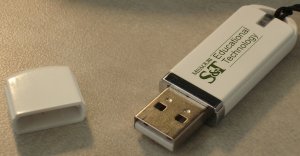 Here is a cheerful thought for the new year. According to this article from Campus Technology, USB flash drives can transmit computer viruses simply by inserting them into an available USB port on a machine and letting the system access the “autorun” feature of the USB flash drive.
At one conference, around 50% of the attendees wound up with an infected USB flash drive. One company actually distributed infected flash drives at a security conference (if you can believe it).
I really like the convenience flash drives offer for transferring files between machines. It is great to have the portability and universality of flash drives (they work on both Mac and PC machines). I use them all the time. Now we are told that flash drives are rapidly becoming a major vector for computer malware distribution. In one experiment a security company scattered several infected flash drives in a parking lot and observed the behavior of the people who picked up the flash drives (the contained malware that transmitted sensitive data to the computers at the security company–the security company was being paid by a bank to audit the security).
Social engineering in a very important and useful tool in the arsenal of malicious hackers. They rely on innate human behaviors to enable the infection of machines with malicious code. Most of us don’t really think twice about inserting an unknown USB flash drive (which is essentially the new floppy disk) into a machine and seeing what is on it.
What does this have to do with education? Well, I’ve been involved in discussions with at least one faculty member about how students should submit assignments. For one class, students create substantially large files (20 MB or more) for their assignments. In a class of 20, this can amount to around 500 MB (or more). This doesn’t really sound like too much space at first. However, multiply this amount of storage space by the number of classes taught by the instructor and then multiply it again by the number of faculty on this campus. It quickly becomes a very large amount of storage space required for assignments (especially if the instructor desires to hang onto assignments for multiple semesters). One possible solution is to have students obtain a relatively inexpensive 2-4 GB flash drive that contains backups of their course files (the originals should be stored on a more permanent machine such as their desktop or laptop, of course). This flash drive is then turned into the instructor at the end of the semester for grading.
Now, the instructor has to rely on the student’s good behavior in handling that flash drive. Students may inadvertently infect their flash drives by inserting into an infected machine. This is then turned in to the instructor who will subsequently infect their own machine. The instructor has no idea where the student’s flash drive has been. The student may not even realize they are carrying an infected flash drive.
For more information on good security practices, visit the IT Help Desk’s Security page.
Finally, this is a little off topic, but if you do a Google images search for “usb flash drive“, you will see some really cool looking flash drives in all shapes, colors, and sizes. I would steer clear of the pill-shaped USB flash drives. However, I do like the “Swiss Army Knife USB Flash Drive”.
]]>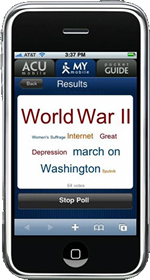 Jennifer Shaner, our campus CERTI Coordinator recently brought to my attention an article she found in the Chronicle of Higher Education about how students at Abilene Christian University (ACU) use iPhones for their clicker-enabled classes.
Apparently, the iPhone application for supporting clickers was developed in-house by ACU programmers. The iPhones (and iPod Touch units) were distributed to all of the first-year students.
However, ACU is not the first, nor the only university to experiment with using smart-phone technology to support clickers. Missouri S&T is also piloting the use of smart-phone technology in conjunction with an application provided by TurningPoint to use integrated clicker/smart-phones in the classroom. The main advantage to using a smart-phone is that many students already have smart-phones, so they would simply need to obtain a copy of the clicker application to run on their smart-phone. It also eliminates the need for students to carry multiple devices, instead relying on a single device which they also use for many of their other communication tasks like email, text-messaging, and web-browsing (and, on occasion, calling their friends and family).
The downside to insisting on using smart-phones for clickers is that not all students can afford to have a smart-phone. The technology may not be available for some brands of smart-phones or on certain smart-phone plans. It is certainly possible to have both standard RF clickers and smart-phone clickers in the same classroom.
One of the more interesting aspects of ACU’s implementation is the ability to display student responses in a “word cloud”, which means students and instructors can see the responses as a random cloud of words (see the image above for an example of what a word cloud might look like). This doesn’t sound particularly useful at first, but the words that students submitted the most will be displayed in larger font. Words that have only one or two submissions will be in correspondingly smaller font. Thus, if you are asking an opinion-oriented question about a topic, you can see at a glance which option students seem to prefer over others. For instance, the word cloud in the image above might reflect the responses to the question, “What is one of the most important events of the 20th Century?”
You can, of course, achieve the same result using a more “standard” clicker question with a bar graph–the word cloud just looks different and may work more effectively for some audiences.
]]>