Learn more about AAC&U’s Project Kaleidoscope and the 2017 Active Learning Day
How can you participate in active learning?
- Spend at least 10 minutes implementing a culturally responsive STEM teaching strategy that promotes active learning in your classroom (Culturally Responsive Teaching is a pedagogy that recognizes the importance of including students’ cultural references in all aspects of learning);
- Identify innovative ways to deepen and extend your departmental/institutional commitment to inclusive STEM higher education reform throughout the week, academic year, and beyond;
- Tell a friend! Reach out to at least one colleague (in either a STEM or non-STEM discipline), and engage in dialogue around what they can do to implement similar strategies in their classroom;
- Tweet or post on social media about your participation using #ActiveLearningDay2017; and
- Share with others what you did on Active Learning Day by creating and uploading a two-minute video! Upload the video to YouTube and send us the link at pkal@aacu.org. We will showcase your effort on STEM Central.
Interested in participating and/or need help with making a video? Contact EdTech@mst.edu to schedule a videographer to stop by your classroom while you engage your students in an active learning exercise!
]]>
Overall, S&T students initiated 63,451 Canvas sessions and racked up 488,422 pageviews over the first week of the Fall 2017 semester. If we average these numbers across the entire site for each day, each student session consisted of about 7 pageviews.
Location – 99.9% of student connections to Canvas originated from within the United States. 94% of those student connections were from within the state of Missouri. Students connected to Missouri S&T’s Canvas from every state in the Union except for Montana, Vermont, and Delaware.
There were a small handful of students connecting from outside of the United States. Students from China, Saudi Arabia, Canada, Mexico, France, Belgium, Greece, Japan, and the United Kingdom also connected to S&T’s Canvas, but all of the sessions originating from outside of the US were numbered in the single digits.
Courses – The most “popular” Canvas course (as measured by student pageviews) is easily Chemistry 1310, the general Chemistry 1 course, with around 23000 pageviews in the first week. With over 750 enrolled users, it’s not a total surprise that it’s a very busy course!
The second most popular course by student pageviews is the FE 1100 Freshman Engineering course with 7745 pageviews in the first week. After that, it’s Math 1215, Calculus 2 with 3148 pageviews.
Rounding out the rest of the top five is Mech Eng 1720 (Intro to Engineering Design) and Eng Man 1210 (Econ Analysis of Engr Projects) with right around 3000 pageviews each.
Technology – In the first week of class, 90.7% of student access to Canvas was on a traditional desktop or laptop computer. 7.9% of student access was via a mobile cellular device, while only 1.4% of student access to Canvas was done on a tablet computer such as an iPad.
Windows is the most popular OS with 77% of sessions being made from a Windows machine. Macintosh machines accounted for 12.8% of sessions. Linux machines represented 0.48% of sessions, and one person even logged into Canvas using their Xbox One!
Chrome is the most popular Browser with 72% of sessions compared to Safari’s 11%. Surprisingly, Edge is more popular than Firefox, with 8% of sessions compared to 5.5%, respectively. Internet Explorer got 1.8% of sessions. The least popular browser, the stock Android Browser, was only used in 0.01% of Canvas sessions.
Mobile device usage was interesting. Literally hundreds of different types of Android-based cellular devices were used to access Canvas, but the Apple iPhone seems to be the most popular single cellular mobile device used, representing 45% of all mobile sessions.
Interested in Canvas stats like these? Follow us for more weekly Canvas analytic updates!
]]>Canvas has published a mobile app meant for instructors called “Canvas Teacher”. Now you can keep track of several different aspects of your course from your mobile device. The Canvas Teacher app is available for both Android and iOS.
Announcements, Assignments, Discussions, Quizzes
The Canvas Teacher app lets you make announcements, browse and grade assignments, moderate discussions, and evaluate quizzes from within the app. The Canvas Teacher app is not meant to be a full replacement for your primary working computer, but rather to compliment your setup and to allow you the flexibility to communicate with students and to check submissions or give feedback when you’re on the go.
Give it a try..
In general, instructors are not heavy mobile users of Canvas. Our usage analytics indicate that less than 5% of instructors regularly interact with Canvas on a mobile device. Why is that? One likely reason is that the previous Canvas app was very student-centric, and instructors couldn’t do much but look at the course. That has changed—with the Canvas Teacher App you can now do many of the tasks you could normally do at your office computer on your smartphone.
]]>On the technology front, we’re supporting the IT department as they work on the continuing rollout of Windows 10 & Office 2016 in classroom computers around campus. In our own technology portfolio, we’re sundowning the Tegrity lecture capture tool in favor of another tool called Panopto, and we’re upgrading to the latest Turning Point software release.
We’ll be in touch as these projects mature, and as the Fall semester gets closer. Have a happy and productive summer!
]]>
The SSC is staffed with 15 trained Student Success Coaches that are ready to assist in your journey towards success at Missouri S&T. All students are welcome to come by the Burns & McDonnell Student Success Center in 198 Toomey to connect with a coach and learn more about the following topics:
• Motivation
• Goal Setting
• Campus Resources
• Getting to Know Your Professor
• Note-taking Skills
• Study Skills
• How to be Successful
Check out the Student Success Center website at http://studentsuccess.mst.edu/
]]>Join us for an interactive workshop featuring faculty who use active learning strategies to increase student engagement and enhance learning
You can expect to learn about:
• A variety of active learning strategies for different classroom environments
• Best practices and benefits of flipping, or partially flipping, a classroom
• Optimal use of clickers
• Generating good classroom discussions, and more!
When: Friday, Jan. 16, 2015, 8 AM-Noon (breakfast provided)
Where: Missouri/Ozark Room, Havener
Please RSVP to: hagnid@mst.edu by Monday, Jan. 12
Sponsored By: New Faculty Programs, Center for Educational Research and Teaching Innovation (CERTI), and Educational Technology
Hope to see you there!
]]>The primary users of iThenticate are academic researchers and publishers, including graduate and doctoral students (and their advisors!) who are writing theses or dissertations. These writers will appreciate iThenticate’s easy-to-use interface as well as several features not found in Turnitin. iThenticate allows for much longer documents to be submitted, as well as allowing for document sharing and version comparison. Unlike Turnitin, iThenticate does NOT save a copy of submitted work to a central database. This means your in-progress publication will stay confidential until it is ready for publication.
If you are a scholarly writer interested in using iThenticate, please contact the IT Help Desk to submit an iThenticate access request to the Educational Technology office; The EdTech office will get you set up and also provide a short training session, if desired. Happy writing and publishing!
]]> University of Missouri-System is providing funding to encourage faculty members to share their expertise with other UM campuses.
Grants will be awarded to faculty interested in developing and offering “shared courses” to be made available on at least two UM campuses.
The RFP linked below provides the full details of the Inter-Campus Course Sharing grant program.
]]>If you are an instructor who created a recording during the outage and it has not uploaded by this afternoon, please submit a ticket so that Educational Technology can manually upload your recording.
Thank you for your patience!
]]>Until Tegrity service is restored, all Tegrity videos will be unavailable for viewing and starting a new recording through Blackboard will not be possible.
If you are an instructor who needs to record a class, this is still possible by double-clicking the Tegrity tray icon, selecting your course, and starting a recording.
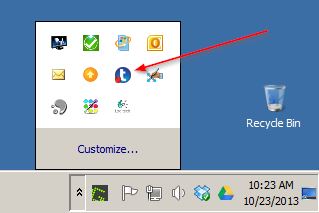
Please be aware that the recorder will take several minutes to start while it attempts to contact the service and the recording will not be uploaded until service is restored. Your recording will be stored safely on the local hard drive.
More information will be shared as it becomes available.
]]>