The committee did a great job working together and asking the hard questions about teaching and learning needs on our campus. We helped facilitate several open forums where feedback from students was gathered to help the committee understand students’ needs and desires. In late fall the LMS Review committee decided to look at other learning management systems to better understand the entire picture of potential learning management systems’ capabilities. According to the committee, “If we’ve never seen anything else, how do we know we are even asking the right questions?”
The committee focused in on the major LMS offerings, Desire2Learn, Canvas, Sakai, and Blackboard. A scoring guide was developed help the evaluation process. (This scoring guide can be found on the Resources portion of the project website.) After preliminary evaluation by the committee, the three finalist LMS vendors were invited to make campus presentations. Following the campus visits, further hands-on evaluation of the products continued. In March, with the evaluation of products completed, the committee unanimously recommended that Canvas would better serve the teaching and learning needs of Missouri S&T. But what does that mean? EdTech has never guided the campus through such a significant change in a foundational learning technology software like this before. What were the steps? It seemed around every corner we have found more steps that need to be taken in order to make this happen. If our campus changes LMS, what about the other UM campuses? How might this affect the UM Course Sharing Initiative? What about procurement?
Since S&T completed our evaluation, Columbia campus has started theirs. MU’s timeline is to evaluate possibilities and gather information through this semester. They plan to make a recommendation by the end of the fall 2014 semester. UMKC has indicated a desire to stay with Blackboard, but is exploring the alternative of having Blackboard, Inc. host their server. There seems to be a lot of activity around LMS across the System!
There has also been an announcement about the evaluation of the ERP (JoeSS, finance, HR) from the President. This is a major endeavor that affects many functional groups across the system. Unfortunately, this appears to be the major stumbling block for further progress toward implementing a better LMS for S&T. Upper UM System administration is asking us to wait on any decisions about the LMS until after there is a plan in place to address the needs of the ERP, latest estimate is 6-9 months.
There are always complexities in this sort of decision and implementation plan. Some are anticipated, some are not. EdTech and the LMS Review committee are continuing to work diligently to resolve the issues that arise in order to settle once and for all what learning management system S&T will be using. For the time being, and through spring 2015 at least, it remains Blackboard.
I can assure you that no matter what LMS is chosen; EdTech will be here to help you. Our goal is to do what is best to address the teaching and learning mission of our campus. As of right now, an extended demonstration phase of Canvas is occurring where EdTech is really digging into the back-end management process and working to understand how everything works while a limited number of faculty and students continue to use Canvas for some classes. Additional feedback from the faculty and students using Canvas this semester will help inform us and the other campuses as we move forward with the LMS discussion and decision. We will continue to work with UM System to understand the process for making this change and what steps we need to complete. If you have any questions about what is happening don’t hesitate to contact us. Stayed tuned for future developments!
]]>If you have not yet taken the Blackboard/LMS Review survey, please take a few minutes to do so. Participants can elect to be entered into a drawing for a prize!
http://tinyurl.com/LMS-Review
(Survey is available until Tuesday, October 1, 2013)
We here in Educational Technology (EdTech) are always excited with new technologies become available, but timing is often a critical issue for us. In this case, Pearson announced the release of their building block just before the beginning of the semester before we had a chance to thoroughly evaluate it.
Whenever new learning technologies are released on campus, we here in EdTech take three things into consideration:
- First and foremost, it must pass a thorough security audit to ensure that confidential student and faculty information is not compromised and that the integrity of the network will not also be compromised. We take both issues very, very seriously.The Pearson building block so far has not passed this first test to our satisfaction.
- New technology must also be tested to ensure that it will work well with the other technologies that have been installed on campus. This is often a very challenging process, but in most cases we are able to find an acceptable solution.Again, the Pearson building block for Blackboard does not meet our expectations for how well the technology will work from inside Blackboard.
- Finally, EdTech staff needs time in order to become familiar with the technology ourselves. We will not be able to provide adequate support to our campus community unless we have a thorough understanding of how the technology works, including any potential quirks. Our general preference is to have the technology made available to us (EdTech) in our development environment in the semester prior to its deployment to the production environment. In practice, this means that we want access to the technology in the Spring semester if it will be used in the Fall. This gives us the opportunity to test the technology, learn how it all works, and use the Summer semester as an early-adopter phase for some instructors.Once again, Pearson Education has not been able to meet this simple requirement despite our repeated requests.
Our commitment in Educational Technology is to provide the instructors we support with the best possible experience we can with the technologies that are available. Only when technology has met the three basic requirements above do we feel comfortable supporting it for the campus.
As always, we welcome all feedback from our campus community on this or any other educational technology issue.
]]>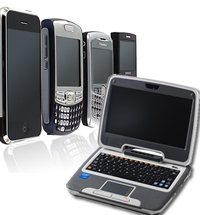 We here at EdTech Enterprises have recently been examining the possibility of using a “netbook” for some applications instead of heavier and more bulky standard laptop or tablet PCs.
However, I recently came across a couple of good articles that look at some of advantages and disadvantages of netbooks in comparison to other technologies.
Jeff Medcalf at the Eternity Road blog investigates whether netbooks are actually useful. He lays out his criteria in terms of the use cases and function points of the most widely used technology. Basically, each technology needs to match up what the technology can actually do (its function points) against what people actually want or need to do (use cases). We do this all the time in EdTech with faculty. In many instances we try to find out what an instructor wants to do and then try to find the appropriate technology to match that need.
Jeff examines desktops, laptops, netbooks, and smartphones and compares
how well each technology fulfills a user’s need to perform certain
tasks, such as voice communication, document creation, record keeping,
entertainment, and so forth. Jeff concludes that desktops and laptops
are “functionally identical for the vast majority of users.” The
primary advantage a laptop has over a desktop is portability while a
desktop often offer lower cost for the same amount of power.
Smartphones have certain advantages that desktops and laptops simply do
not offer yet (mainly high portability and superior voice
communication). Netbooks simply cannot do everything that a
desktop/laptop can do and they also can’t do everything that a
smartphone can do. In essence,
A netbook serves
essentially no purpose that is not served by one of the other devices
you must have in any case [i.e. a desktop/laptop or a smartphone —
ed.]. It is an extra, a luxury.
In his argument, Jeff links to a more colorful article by Joey Devilla
that tries to draw an analogy between smartphones/netbooks and apple
pies in the fast food industry. Specifically, he describes the
competition in apple pies between “Monarch Burger” [MB] (which has a
rather creepy mute monarch for its mascot) and “Jester Burger” [JB]
(which has an almost equally creepy clown in a brightly colored
jumpsuit as its mascot).
MB tried selling pies that looked
like homemade slices of apple pie, but didn’t really taste like one.
Having sampled them in the past, I would tend to agree that it was
never the best pie out there. However, MB was trying to set up the
expectations in customers’ minds that they were eating real homemade
apple pie, even when they weren’t.
In a similar fashion, a netbook is designed to mimic a laptop’s form
and function, even though it is not quite as powerful or as capable as
a true laptop. It also can’t quite match the portability and features
of a good smartphone, even though it may have some features that a
smartphone doesn’t have.
Joey extends the netbook analogy to include network computers, also known as “thin clients” that have a rudimentary operating system, but the bulk of the work of the machine is done behind the scenes on servers located elsewhere. EdTech is also researching the viability of using a thin client for certain applications, such as cloud computing. This would be an attempt to have certain software packages available in a virtual desktop environment, rather than physically located in specific CLCs on campus, but I digress.
Network computing, according to Joey, was an attempt to bridge the gap between one type of computing application and more recent computing capabilities. It never really caught on because web-based applications became available, thus software applications can truly live “online” in a virtualized world instead of being accessed through specific physical portals, which is what thin clients were designed to do.
The Jester Burger apple pie, in contrast with the Monarch Burger’s, was a deep-fried pocket of pie crust filled with apple pie filling, similar to a “Hot Pocket”, only much, much tastier. Because it was designed for people to eat with their hands, the “on-the-go” crowd found it much more appealing to order one of these from a fast-food joint instead of the “homemade” style of apple pie that required a fork. In other words,
The Jester Burger pie fills a need without pretending to be something it’s not, and I think smartphones to the same thing.
Smartphones are extremely portable, integrate several different devices (mp3 player, digital camera, phone, email, pager, and much, much more) into a single unit, and are generally quite affordable. In addition, it is even possible to connect from a smartphone to a desktop (one of our technical support analysts can remote desktop to the machines he supports from anywhere–it’s pretty neat), thus making the applications on your desktop available from anywhere you need to be.
Joey concludes that when people buy a smartphone, they are essentially buying their primary phone that they will use for just about anything they can. When people buy a netbook, they are buying a secondary machine to supplement their primary machine for matters of convenience. For instance, I primarily use a desktop machine, but I often take a tablet PC with me to meetings or other places on campus because it is much more portable and can link to my desktop machine if I need it to.
One of the questions we have to face here in EdTech is how to evaluate technologies such as netbooks. I think both Jeff and Joey have convinced me that netbooks are, in fact, a transitory technology that will quickly be replaced by smarter, more powerful, and more portable technologies.
UPDATE: Several commenters to Joey’s article rave about the great experiences of using netbooks, which indicates there is a niche market. However, they seemed to miss the whole point of Joey’s article (and by extension, Jeff’s) that while netbooks may be a great tool NOW, there is a reasonable expectation that whatever niche they currently fill will be replaced by newer and improved smartphones with better input technology, or lighter, more powerful laptops that are still large enough to be used more comfortably than many netbooks and are equipped to handle the standard tools and applications found in current desktops and laptops (many netbooks are not quite capable of handling a Windows or Mac-based operating system, so run some version of Linux instead). The price point for laptops and smartphones can also be expected to drop over time, just as every other technology has become cheaper and more affordable. Netbooks are cheap, but the manufacturers of netbooks sometimes sell them at a loss because they supplement a user’s needs, rather than become the user’s primary need–just like some auto manufacturers sell hybrid vehicles at a loss due to the fact that they also rely on other customers buying larger, more powerful vehicles to serve those customers’ primary transportation needs.
]]>